280 SDK Screen Design
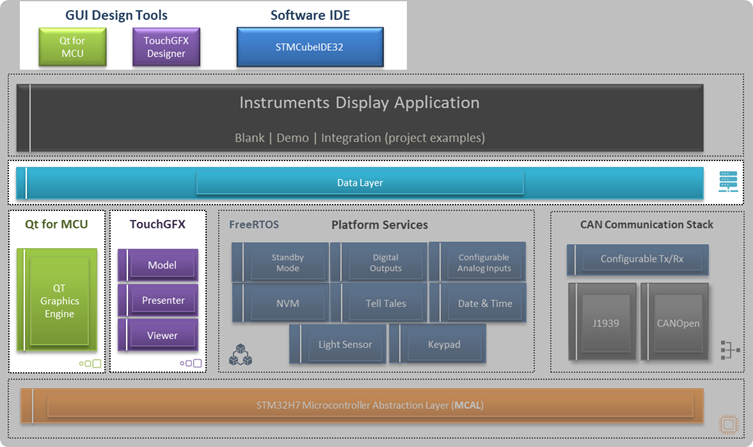
The 280 ST/QT-SDK supports two paths for Screen Design:
Qt-Creator
ST TouchGFX
Both graphical user interface (GUI) design tools are supported by the 280 SDK, but each requires a specific SDK variant:
Qt Creator → 280 Qt-SDK
TouchGFX → 280 ST-SDK
Both Graphical User Interface (GUI) Design Tools are supported by the 280 SDK, though 2 separate 280 SDK version are used, Qt-Creator must be used for the 280 Qt-SDK, while TouchGFX must use 280 ST-SDK.
Available Resources
Qt Academy (focus on Qt for MCU).
Code Generation and Integration
Both GUI tools auto-generate C/C++ source code from the graphical design. This generated code integrates with:
The corresponding Graphics Engine
Other components of the 280 SDK
Data Binding and Business Logic
To display data on the screen, GUI design tools fetch information directly from the Data Layer, which abstracts the data source.
Key points:
Data fetching, formatting, and business logic are implemented either within the GUI tool or in designated sections of the auto-generated C/C++ files.
The Data Layer provides Get/Set interfaces for accessing required data.
This includes not only data values but also button states and signals for icons or tell-tales.
Applying GUI Updates
To make GUI design changes effective:
Rebuild the SDK project using STM32CubeIDE.
Reprogram the target unit with the updated firmware.