280 SDK Platform Services
The 280 ST/QT-SDK includes configurable 280 Platform Services designed to support the target application. These services form part of the SDK’s middle layer, positioned above the MCAL layer, as shown in the diagram below:
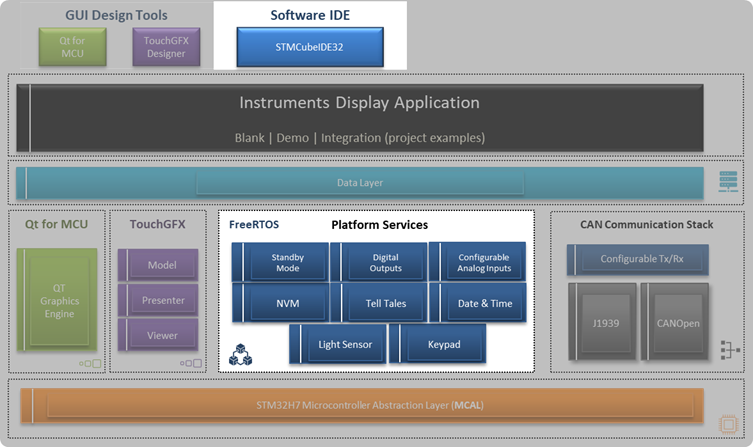
Configuration Overview
All Platform Services configuration options are defined in the 280_Config.h header file, located under the user_modify_files folder within the SDK project structure:
280_st/qt_sdk_xxx
¦     +---Core
¦     +---Drivers
¦     +---Middlewares
¦     +---tools
¦     +---TouchGFX
¦     +---user_modify_files
¦     ¦     280_Config.h           <------ 280 Platform Services configurations
¦     ¦     CANOPENData_Layer.h
¦     ¦     EE_PH_DB.h
¦     ¦     EE_User_define.h
¦     ¦     gen_define.h
¦     ¦     gen_pgn.c
¦     ¦     J1939Data_Layer.h
¦     ¦     j1939_datatype.h
¦     ¦     User_Define.h
¦     ¦     user_task.c
Purpose of the Configuration File
The 280_Config.h file allows developers to customize display-related settings for their specific application requirements. Examples of configurable parameters include:
Input selection and mapping
Display type and resolution
Sampling rate
Debouncing options
These settings apply regardless of whether you are using 280 ST-SDK or 280 QT-SDK.
Note: The configuration file only affects Platform Services. Customization of display screens, navigation, and overall look and feel should be performed using TouchGFX (for ST-SDK) or Qt Creator (for QT-SDK).
Applying Configuration Changes
To apply updates to the Platform Services configuration:
Rebuild the SDK project using STM32CubeIDE.
Reprogram the target unit with the newly built firmware.
Top Level Configuration Options
The following table lists the primary 280 Platform Configuration options:
Platform Configuration Name |
Description |
|---|---|
SDK_SERVICE_KEYPAD |
Enables individual buttons-keys and overall keypad backlighting. Configures short-press timing with 10 ms resolution. |
SDK_SERVICE_RTC |
Enables the battery-backed Real-Time Clock for date and time tracking. |
SDK_SERVICE_DIGITAL_OUTPUT |
Configures each digital output as High-Side, Low-Side, or Open Driver. Also sets output update resolution in 100 ms increments. |
SDK_SERVICE_LED |
Provides configuration for platform LEDs (Red and Amber), including blinking rate. |
SDK_SERVICE_CFG_INPUT |
Enables and configures display analog inputs to read voltage, current, resistance, or frequency signals. |
SDK_SERVICE_LCD |
Allows configuring TFT LCD backlight settings. |
SDK_SERVICE_PM |
Power management and standby configuration. |
SDK_SERVICE_WATCHDOG |
Watchdog timer configuration. |
SDK_SERVICE_POWER_MONITOR |
Power monitoring configuration. |
SDK_SERVICE_EEPROM |
Configures NVM data size and update rate. |
SDK_SERVICE_SWTIMER |
Software timer configuration. |
SDK_SERVICE_CANOPEN |
Enables and maps the CiA 301 CANopen protocol stack to the CAN channel. |
SDK_SERVICE_J1939 |
Enables and maps the SAE J1939 protocol stack to the CAN channel. |
Note: Additional detailed configuration options, including dependencies on these top-level settings, are available in 280_Config.h.