Introduction
The 280 Instrument Display is designed to provide a responsive embedded system for delivering a reliable instrument and control interface. This document introduces the 280 ST/Qt Software Development Kit (SDK) for the 280 Instrument Display powered by the STM32H743II microcontroller, leveraging STM32CubeIDE and the GNU Tools for STM32 toolchain for firmware development, alongside TouchGFX or Qt for MCU for advanced graphical user interface (GUI) design.
280 Instrument Displays |
Description |
|---|---|
|
The 2.8” display helps operators to see critical data quickly and efficiently with a 4 button keypad for navigating through multiple screens of information. |
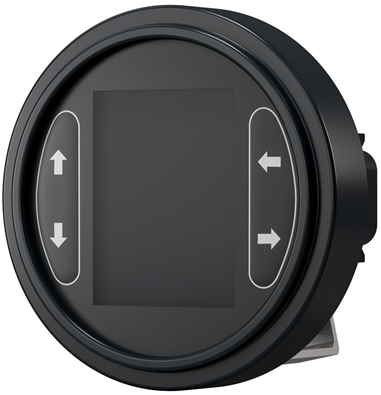
The 280 ST/Qt SDK is a comprehensive embedded software platform designed exclusively for custom applications built on the 280 Instrument Displays hardware. It offers a robust set of software components that streamline the development process, enabling engineers to efficiently create fully functional embedded applications tailored to specific customer requirements.
By leveraging the 280’s integrated peripherals and graphical capabilities, developers can explore a wide range of possibilities to meet diverse industrial, agricultural, and construction equipment needs.
280 ST-SDK overview
Functionality available in the SDK:
Feature |
Short Description |
|---|---|
2.8’’ TFT LCD |
Fully customizable 240x320 Pixel Resolution Display with configurable backlighting 565 RGB Color Palette |
J1939 |
SAE J1939 Protocol |
CANOpen |
CiA 301 CANOpen Protocol |
Configurable Inputs |
Configurable Analog/Digital Inputs: (Voltage/Current/Resistance/Frequency/Digital) |
Digital Outputs |
High Side/Low Side Driven |
NVM Storage |
Data preserved across ignition cycles |
Keypad |
4 Front face configurable key buttons with configurable backlighting |
Front Face LEDs |
Configurable Tell Tales |
Stanby Mode |
Sleep low power operation |
Power Monitoring |
Power tracking and monitoring |
Real Time Clock |
Battery backetd Date & Time counting |
Key Benefits of the 280 ST/Qt-SDK
Accelerated development timeline through ready-to-use components
Integrated low-level driver management for simplified hardware interaction
Portable and reusable software modules for flexible deployment
Minimal technical expertise required to get started
Pre-configured and stable software architecture for reliable performance
Secure implementation of custom and proprietary algorithms
Acronyms
Acronym |
Definition |
|---|---|
API |
Application programming Interface |
CAN |
Control Network Area |
CiA |
CAN in Automation |
COB |
Communication Object |
CRC |
Cyclic Redundancy Check |
DB |
Database |
BLE |
Bluetooth Low Energy |
DL |
Data Layer |
ECU |
Electronic Control Unit |
EDS |
Electronic Data Sheet |
EEPROM |
Electrically Erasable Programmable Read-Only Memory |
GB |
Gigabyte |
GUI |
Graphic User Interface |
IDE |
Integrated Development Environment |
LCD |
Liquid Crystal Display |
LSS |
Layer Setting Services |
NMT |
Network Management |
PCKT |
Packet |
PDO |
Process Data Object |
PGN |
Parameter Group Number |
QSPI |
Quad Serial Peripheral Interface |
RAM |
Random Access Memory |
RTC |
Real Time Clock |
RTOS |
Real Time Operating System |
SDK |
Software Development Kit |
SDO |
Service Data Object |
UI |
User Interface |
USB |
Universal Serial Bus |